Dinkar Kamat

Updated last month

The best and efficient iPhone management software

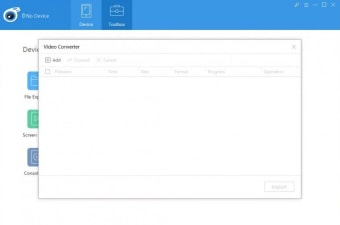
iTools is a powerful and intuitive tool designed to manage your iPhone, iPad, and iPod Touch data directly from your available devices. This tool is positioned as a direct, and often superior, alternative to Apple’s own iTunes. This offers a remarkably user-friendly interface that emphasizes simplicity.

iTools acts as a comprehensive media manager, granting you control over a wide array of files, including images, videos, audio, documents, and iTunes media. It provides access to your iDevice's entire file system, allowing for seamless organization, synchronization, backup, and restoration of your essential data.

Comprehensive iDevice data control

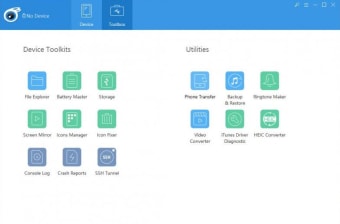
The core strength of iTools lies in its diverse set of features that go well beyond basic media management. The iTools File Manager and Icon Arranger give users granular control, allowing them to drag-and-drop data between the PC and their device and manage screen icons easily—a significant improvement over on-device organization. This level of direct file system access is a major benefit for power users.

Data protection is straightforward with its Backup, Restore Feature, and Data Migration tool. Backing up and restoring data is a simple selection and click process, and the migration feature makes moving content from an old iDevice to a new one quick and efficient. However, users should be aware that installing third-party software like this to manage sensitive Apple data is a potential security risk.

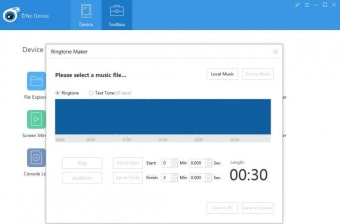
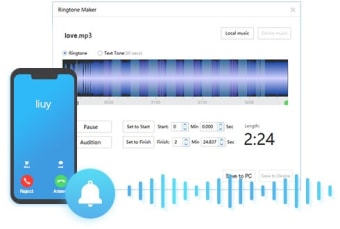
Beyond file management, this includes several innovative utilities. The Ringtone Maker lets you create custom ringtones from any sound clip, while iTools AirPlayer enables screen sharing to a larger Mac or Windows PC display for presentations or entertainment. Furthermore, the Battery Master provides an in-depth report on your device's battery health, detailing factors like cycle count and boot voltage, offering proactive insight into battery longevity.

Essential alternative for management

iTools presents itself as a robust and essential utility for any iDevice owner who feels constrained by iTunes. Its combination of a simplified interface and a vast suite of features—from granular file and icon management to battery health monitoring and custom ringtone creation—makes it a powerful tool. The program successfully delivers on its promise to offer a faster, easier, and more comprehensive way to manage your Apple content.


Dinkar Kamat

Dinkar has more than 10 years of experience in content creation, including technical articles, travel writing, and product strategy. His expertise spans SEO, digital marketing, and structured editorial work. He focuses on producing content that is both accurate and accessible for diverse audiences.

  • Pros

    • User-friendly interface with one-click task completion
    • Comprehensive media and file management, including drag and drop
    • Unique tools like Battery Master and Ringtone Maker
    • Easy backup, restore, and data migration functions
  • Cons

    • Potential security risk from using third-party software
 0/6

App specs

Also available in other platforms

Program available in other languages


Icon of program: iTools

iTools for PC


User reviews about iTools

3.5

24 reviews

Add review

Main reviews for you

  • Anonymous user

    It is very nice app, easy to use and i will recomend to my people too.

  • Anonymous user

    Exceelent, never had softwere like this, like to used it as in continuation.

  • Anonymous user

    2019. júl. 21. - Download iTools installer for Windows and Mac. Backup, manage all iOS devices including iPhone, iPad an

  • Anonymous user

    Users should be aware that they harvest your phone's serial number so who knows what else they are doing. You download and install iTools and then when you want to do some function there is yet another download for that part of the software. So it needs an open internet connection. It is during that time that it sends your phone's serial number to them. I don't know what else it transmits about you to Hong Kong.I say this because I tried to do the demo again and while software makers have various ways to prevent that like leaving some little thing in your registry that survives even deleting and reinstalling, in this case it was a new install on a totally different computer. How else would it know that my trial time was up unless it recognized my iPhone? Do the math. If I'd known that I would never have even tried it.Being an iTunes hater, I like Syncios. (Still have to have iTunes that Syncios uses to talk to the phone.)

  • Anonymous user

    Not a free software.It is trial version. It asks licence for full features.

  • Anonymous user

    ITools is a device which is use to make or redesign a ringtone in windows. iTools for window is good and important either for phone making or other valuale functions of the system

More

You may also like

Alternatives to iTools

Explore Apps

Latest articles

Laws concerning the use of this software vary from country to country. We do not encourage or condone the use of this program if it is in violation of these laws.
Softonic

Is iTools safe?

98/100

Score result: Clean

This file passed a comprehensive security scan using VirusTotal technology. It is safe to download.

  • Virus free
  • Spyware free
  • Malware free
  • Verified by Security Partners

    VirusTotal logo

Scan Info

Last scan
Tuesday, November 14, 2023
Scan provider
VirusTotal · Full report

File Integrity

File
itoolssetup_4.5.1.8.exe
SHA256
d0d8c24ae4cd4111296888ef6070fba7f4af3e9a64e9848419cbc3e1a7b4d902
SHA1
1a7ce6f9a1c48b5f15f7b42f0bec114b9257d68e

Softonic security commitment

iTools has been thoroughly scanned by our advanced security systems and verified by industry-leading partners. This file comes from the official developer and has passed all our security checks, showing no signs of viruses, malware, or spyware.